November 4, 2026
What's new: The Coverage tab, new in the Granted app, for your health plan, bills, and claims Who it's for: All Granted members on app version 1.0.30 or later, or on the web. If you haven't added your insurance yet, you'll see a setup card in the tab. Cost: Free Where to find it: the Coverage tab in the Granted app. On your phone, update the app to see it.
What is it?
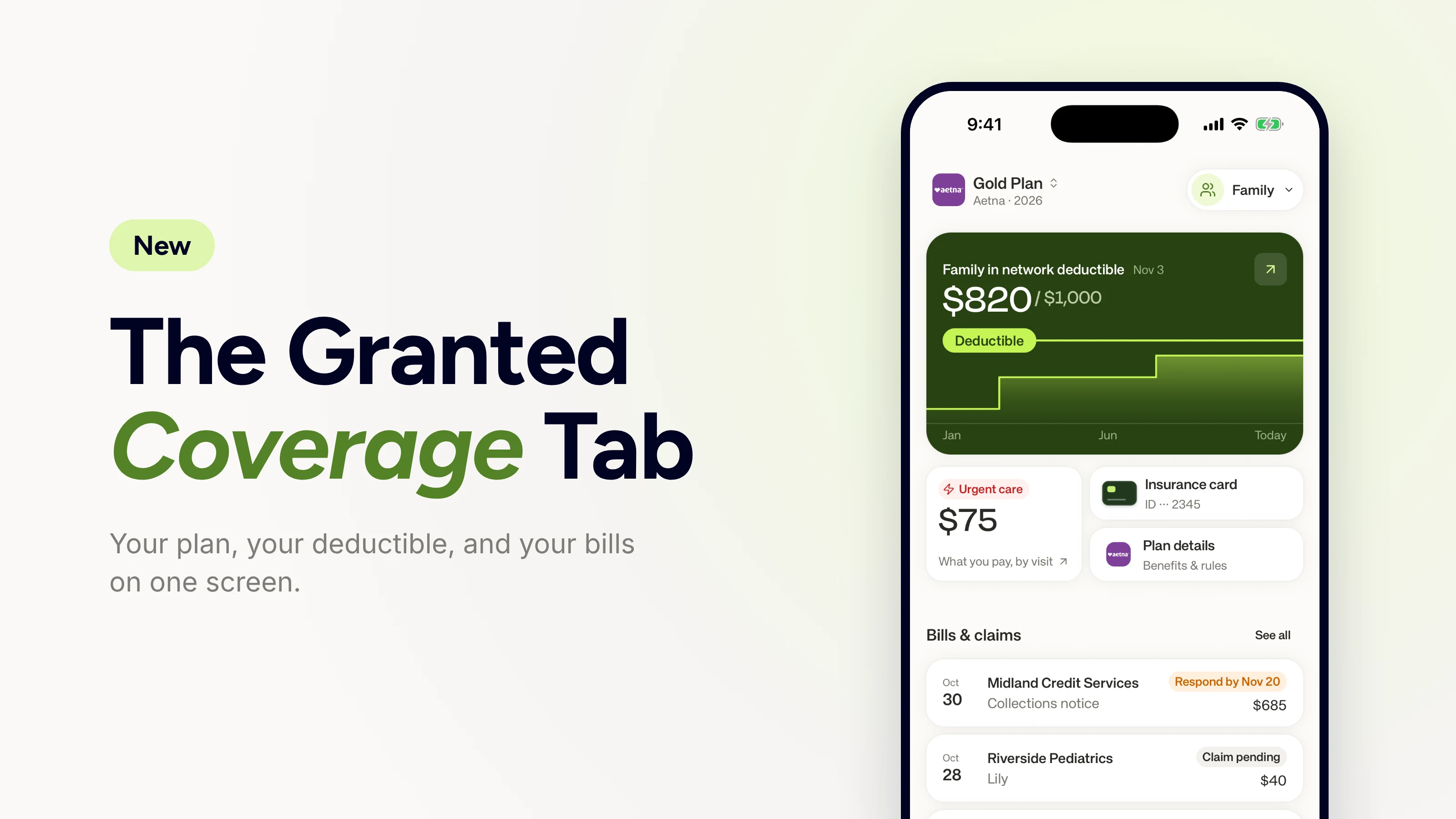
The Coverage tab in the Granted app shows your health insurance plan at a glance. We get your plan details from your insurer and put your totals, insurance card, plan details, and bills and claims on one screen.
What you can do with the Coverage tab
With the Coverage tab, you can:
Track your deductible. See how much you've paid toward your deductible, the amount you pay before your plan starts sharing costs.
Watch your out-of-pocket max. Track your progress toward the most you pay for covered in-network care in a plan year.
Switch between you and your family. See your own totals or your whole family's.
Check what a visit costs. See what you pay for a visit, like a copay (a set fee) or coinsurance (a percentage of the cost), for most types of care.
Pull up your insurance card. Copy your member ID and group number, or show your card full screen at a front desk.
See your bills and claims. Every bill you've uploaded and claim we've pulled, with what you may owe.

How it Works
Open the Coverage tab. It replaces the Bills tab, so your uploaded bills are still there.
Connect your insurance account. Sign in to your insurer's website through Granted and approve the connection.
See your totals and claims. We check your plan with your insurer every week and show your deductible and out-of-pocket progress, plus your claims from this year. Your totals chart starts at our first check and fills in week by week.
How to set up the Coverage tab
Update the app and open the Coverage tab, then pick your insurance company. Then connect your insurance account by signing in to your insurance company's website through Granted and approving the connection. That's how we get your plan details and your claims from this year. Depending on your insurer, we may also ask for your member ID, the number on your insurance card. If we don't have your name and date of birth yet, we'll ask for those too, and for you to accept our terms.
What you pay for a visit, like a copay or coinsurance, shows for most services, but it depends on what your insurer sends. Some plan rules, like whether a copay counts toward your deductible, are often only in your plan documents. Dental and vision plans aren't on the tab yet. Bills and claims show your whole household for now.
Frequently Asked Questions about the Coverage tab
Why doesn't my deductible on the Coverage tab match my insurer's website?
Your deductible on Granted follows what your insurer has processed. We update the Coverage tab once a week. A new claim shows up once your insurer processes it, which can take a few weeks after a visit, and then within a week of our next check. If the numbers still differ after that, message us in the app chat.
Where did the Bills tab go?
The Bills tab is now part of the Coverage tab. Scroll to Bills & claims and tap See all to find every bill you've uploaded and every claim we've pulled. Bills that need something from you are marked "Needs you."
What do the labels on my bills and claims mean?
Each bill or claim in the Coverage tab can show a label.
Updates from Granted: Needs you, New message, In progress, Resolved. These show when we're working on that bill for you.
Updates from your insurer or provider: Claim pending, Partly denied, In collections, Respond by a date, Overdue.
How does Granted get this information?
Granted gets your plan information in two ways. When you pick your insurance company, we check your plan through a healthcare clearinghouse, a secure network that insurers use to share coverage and benefits details. If you link your insurance account, we also pull your claims from your insurer's member website through our own secure connection.
Is my information safe?
Granted is HIPAA-aligned, SOC 2 certified, and follows strict standards for handling and protecting your data. We never sell your data.
Who is Granted?
Granted is a digital health advocate that reviews medical bills, finds billing errors, negotiates bills, appeals denied claims, and checks eligibility for income based discounts. The Coverage tab is a free view of your plan, so you can check a new bill against what you've already paid. Granted is free to start. If we lower a bill, our fee is 10% of the negotiated savings, capped at $300 per bill.
Last updated: November 4, 2026. We update this post if the Coverage tab changes.